My struggles in understanding and learning about Object Oriented design, and the tools and knowledge I've taken from them.

Monday, February 7, 2011

PHP Code that Looks like .Net code

This blog references PHP files available for download here: Click Here

In programming, I think it's important to learn. Learning can involve new aspects of your chosen language, or new languages. I've been thinking about my PHP days lately. I really know a lot more about programming now then I did when I was actively programming in PHP.

When I go back and look at some of the code I was producing in PHP, I cringe a bit at all of the principles I see myself violating. Most of the PHP code I wrote were big balls of mud.

So, as an academic experiment, as well as to try to re-sharpen some of my PHP skills, I decided to write some base libraries that I may (or may not) eventually use someday.

As with any language (programming or verbal), or with any foreign concept, the first thing to do is to find metaphors that allow us to relate the themes of the thing we're learning to the things we already know. The classic example in programming is the Hello World application.

Well, I'm not too interested in creating a "Hello World" for PHP, because I'm already familiar with a little bit of how PHP works. But what I wanted to do was to build some PHP code that looks (at least a little bit) like .Net code.

So, after thinking a little bit about what libraries I use most in .Net, I centered around System.Data, in particular DataTable (and DataRow, DataColumn, DataRowCollection, and DataColumnCollection). I haven't created DataSet yet, because there's only so much time in the day.

After thinking a bit more about how I would build some of this PHP code that looks like (has a similar interface) the System.Data .Net library, I concluded that I wanted to have a base Collection object. So I created it, and put it into a file called System.Collections.php. Below is a diagram of the code I created:


As you can see, in my PHP code, a DataTable has a DataRowCollection and a DataColumnCollection, as well as a couple of the external interface behaviors of .Net System.Data.DataTable (NewRow() and AddRow()); however, because of core differences between C# (or I guess .Net languages) and PHP, there are a few changes. Below are the issues that I encountered in this mini-project:

1. I couldn't figure out if I could use an indexer type property to have square brackets ([]) to represent an indexed item in a collection. Therefore, I left that for later.

2. There are some pretty serious differences between C# and PHP in terms of how they type variables. In C#, generally you generally define a variable as a type on the left side of the variable name, and you initialize it on the right side (eg int a = 3; OR Person p = new Person()). You don't have to do that in PHP, so you can initialize a variable as any type, which throws a bit of a wrench into the model of how I see the world.

3. PHP (at least 5.0) supports a lot classic OOP concepts such as inheritance, interfaces, polymorphism, Exception handling, etc. Obviously, the syntax of how to do this is different than it is in C#, so I dealt with some of the pains of the languages' differences.

4. PHP (from my understanding) does not support generic variables. So I can't use List variables the way I like to in C#. So, that's why DataRow and DataRowCollection both inherit from my Collection class.

But, I think my finished product gives me a basis to build on for later. So, if I wanted to initialize a DataTable in PHP code, I would include a reference to System.Data.php, and do something like below:
 
include 'System.Data.php';


$dt = new DataTable();
$dt->AddColumn("FirstName");
$dt->AddColumn("LastName");
$dt->AddColumn("Age");


$dr = $dt->NewRow();
$dr->AddValue("FirstName", "Tim");
$dr->AddValue("LastName", "Claason");
$dr->AddValue("Age", 29);


$dt->AddRow($dr);

Notice in the above that, unlike c#, I can't do $dr["FirstName"]. Maybe there's a way to do this in PHP, but in my (short) research time, I didn't find it.

Obviously, this interface isn't exactly the same as .Net's System.Data, but it's close enough to give me a decent metaphor between PHP and C#.

Please note that I haven't tested this code yet, so there are no guarantees as to whether or not it works. If it does work, expect more blog entries on this topic.

To download the PHP Code I've got so far, Click Here

Wednesday, February 2, 2011

Consistency in Coding (And Databases)

I've been thinking about consistency in coding, and coding standards. The thoughts I've been having on this concept have been sparked by my basic human desire to have consistency in my life, along with work I've been doing with the CRM that my company uses.

I've been doing a whole bunch of work on the database of this CRM, basically copying records across a couple dozen tables. I've noticed lots of inconsistencies and design problems in the database, and I thought I would enumerate what those problems were, and try to find the lessons that I can take from those design problems:

1. The database employs the use of natural keys, as opposed to surrogate keys. An example of a natural key is the combination of a first name, middle name, last name, and social security number to identify the uniqueness of a record. An example of a surrogate key is giving a unique number to each record, and targeting that unique number for database selects, updates, etc. I believe that employing natural keys is a poor design decision, but not everyone agrees with me on that; however, I will never ever ever build a database that relies on natural keys.

2. There are a few tables in the database that rely on surrogate keys - an unnecessary inconsistency because the table has fields in it that allow it to link to its parent table via the natural key

3. There are major inconsistencies in column naming. Some date columns are suffixed with _ISO, some abbreviate Date with "DT" and some spell "DATE" out in the column name. There are other columns that have similar naming inconsistencies, too, such as "Account" and "Acct" or "Code" versus "CD" or "Event" versus "EVT". I am always mixing these up, and all that confusion (which I'm sure occurs internally in the company that makes this CRM, as well) could have been avoided by simply making naming conventions more consistent.

4. Data Duplication. The database has datetime stamps to indicate when the record was created, and it also has an integer representation of the time it was created. I'm sure this integer representation is a carryover from legacy code and technology, but the column is still there, taking up space, and wasting resources.

5. Lack of normalization. The database has a UDF recorded value table that has about 200 columns, and at least 2/3 of those columns are always null. That table should be refactored/pivoted, which would reduce design complexity, and the amount of code required to represent that table -- not to mention memory required to store that data.

6. Too many tables with too many columns. The average table seems to have at least 75 columns (with several having more than 200)...that's a database design smell, in my mind (and nose).

There are other things too, but you get the picture.

So, why do these problems happen? In my experience working with software design, there's a number of reasons:

1. Legacy technical debt. Carryover from older technologies that didn't have some of the bells and whistles we have now are a major reason why inconsistencies occur in the software - it's usually easier to write a wrapper to interact with old technologies than it is to completely re-write them.

2. Too many people. Different people working in different areas of the product (along with no naming conventions/standards/whatever). If there isn't a set standard on how datetime columns, bit columns, recurring-theme columns are named in the database, then there's going to be inconsistencies.

3. Learning. No one knows everything, and I know less than most people; however, I'm learning all the time, and I am constantly finding things I did months or years ago that I would do different now. This happens all the time in software, and I see plenty of examples in the database where it appears this happened.

4. Urgency to the market. Let's face it, software is meaningless/worthless if it never gets out of design, construction, or testing phases. Not to mention that companies have payrolls to meet. There are always trade-offs between design excellence and need to get a product to the market. And sometimes those who control the money decide that they'd rather deal with higher support costs 3-6 months from now than higher development costs today.

5. Dysfunctional development process. When the development process doesn't support what the software is trying to do, and the team isn't "optimized" to use developers' strengths in the right way, it can lead to "cowboy programming".

What to do about it?

There's all kinds of things to do. In fact, there's people and companies who make their living off of solutions to these problems. I don't have all the answers, but here's what I do to avoid some of these problems:

1. Define a clear coding standard. You can borrow from Microsoft, online forums, or convene with other developers to make decisions on how members, attributes, methods, interfaces, classes, etc should be named. There are also plenty of online and book resources on style guidelines.

2. Keep learning. Learning things, in the short term, leads to inconsistencies, but helps push your code, database, or whatever, to be as good as it can be

3. Incremental refactoring. Rome wasn't built in a day, and neither is a 100,000 line application. Baby steps is the way to go. Slowly, but deliberately, refactor to achieve consistency.

4. Choose the right software development method. Waterfall, SCRUM, TDD, XP, some combination of all of these...Team buy-in, and a methodology that suits the skill set of your team (including your business analysts and QA people, along with developers) is important to produce quality products.

5. Pragmattic Programming. I love the book "The Pragmattic Programmer," because it outlines the type of developer we should all strive to be. I wrote a blog on "Writing Code That Writes Code". In it, I demonstrated an application that helps me produce very consistent code.

Like everything else in life, whether it be good health, a good family life, a good career, etc, there's no silver bullet. Practicing fundamentals, self-improvement, humility, and understanding that you will never be perfect is the way forward.

Tuesday, February 1, 2011

ID3 Decision Tree in C#

This blog references an executable and source code available for download. To download the referenced executable, Click Here

To download source, Click Here

It seems like just about anything "new and shiny" can distract me from the last "new and shiny" thing that I decide to devote all my energy to learning about and/or building. Case in point: AI (artificial intelligence). There are all kinds of ways to use AI, and there's all kinds of subtechnologies that make up the field of Artificial Intelligence.

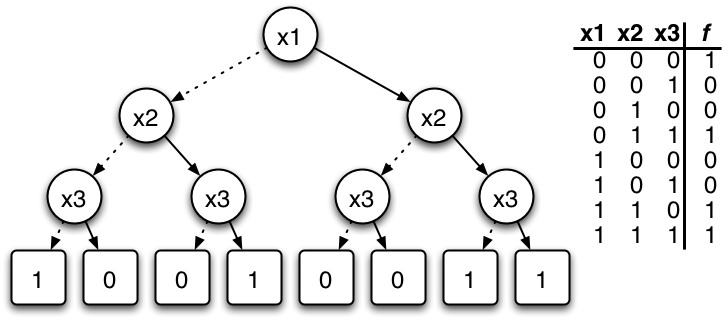
Having said that, the first technology that has been easy enough for me to get my head around is "Decision Tree Learning." A decision tree is basically an algorithm that takes a set of collected data, the outcomes of each collection of inputs, and builds a tree to demonstrate the best input variable for a particular output. From my college days, I had lots of statistics classes that were very similar to this concept - particularly, regression analysis.

A decision tree ends up looking a bit like the image below:


An example of a decision tree implementation is, if you want to gather a bunch of information about what inputs affect whether or not it's going to rain, a decision tree can build a graphical representation on whether it will rain or not based on the inputs you provided. Inputs for a decision tree may include cloudiness, temperature, relative humidity, what the weather report says, etc. The decision tree algorithm should calculate the input that best guesses whether or not it's going to rain, and then finds the next best variable, etc, until a tree has been built that demonstrates a decision tree for determining whether or not it's going to rain.

To demonstrate with words: If the weather report says it will rain, and if the relative humidity is high, and it's very cloudy, then the output will be rain.

Well, you get the idea...I don't completely have my head around the various ways to build a decision tree. In fact, I'm quite a novice when it comes to demonstrating decision tree algorithms.

The reason that I'm writing this blog entry at all is because I found a pretty decent implementation of an ID3 decision tree in C# at codeproject.com. But when trying to use it to suit my needs, I wasn't able to make the original code suit my needs. There were a few problems with the code that I felt compelled to fix.

I don't know much about fellow who wrote this particular C# ID3 algorithm except that his screen name is "Roosevelt" and he's from Brazil - and the source code is commented in Portugese. And he wrote it a long time ago.

The funny thing is that this was really the only C# code I could find on the subject, and this code was written 7 1/2 years ago. ID3 is not the most recent technology in Decision trees (evidently, C4.5 is a more recent iteration of decision tree learning). Sure, Java code exists, but I'm not a Java developer, so some of the base libraries referenced made it difficult for me to translate the Java code to C#.

So, I decided to see if I could take Roosevelt's code and make it less rigid (you see, all of the source data and attributes are statically defined in the code. There's no way to configure the data without recompiling, and that just won't do). In my iteration, the decision tree can be built dynamically based on the source data - it does not rely on statically defined concepts within the code, anymore (and output is not in Portugese, either).

I did some other refactoring of the code as well, and made it a bit better - probably still not quite right, but I think it's quite a bit better.

To download the executable I built, Click Here

To download source, Click Here

Now that I've gotten my fill of this "new and shiny" thing, I can get back to the last "new and shiny" thing I was working on, and maybe some day (hopefully sooner than 7 1/2 years from now), someone who is zealous enough to improve my code can do so, and share it with the world. For now, this is my contribution.

Followers

Search This Blog

Powered by Blogger.